The Anti-Context-Switch Stack: Structuring Your Data Tools So Debugging Feels Linear

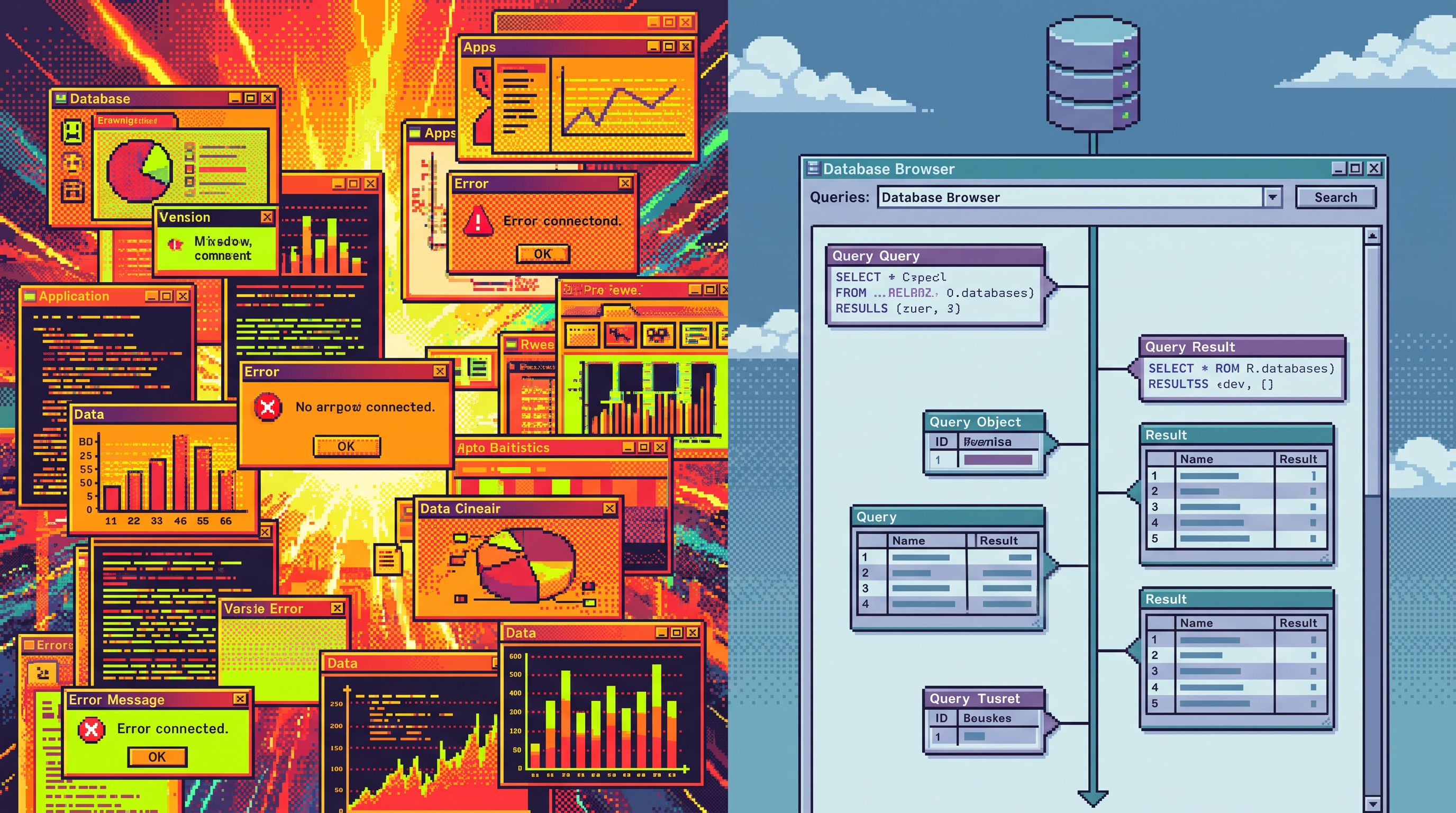
Most teams don’t lose time because they lack data. They lose it because every question about production fans out into five tools, three tabs, and a dozen half-finished threads of thought.
Debugging stops feeling like reading a story. It feels like flipping channels.
An anti-context-switch stack is a deliberate response to that. It’s a way of structuring your data tools so that:
- You move from signal → rows → explanation in a straight line.
- You don’t keep reloading the same context in different UIs.
- On‑call, support, and product can all follow the same path.
This post is about what that stack looks like in practice, and how tools like Simpl can sit at the center of it as the calm, opinionated surface for production reads.
Why context switching quietly breaks debugging
Context switching is not just “too many tabs.” It’s a cognitive tax on every step of a debug session.
Each time you jump tools, you pay to re-establish:
- Where you are in the story (which user, which job, which time window)
- What the tool is good at (logs vs traces vs rows vs dashboards)
- What is safe to do (read‑only vs write, prod vs staging, experimental vs canonical)
A typical incident or tricky bug might look like this:
- Alert fires in your incident tool.
- You open a dashboard to see metrics.
- You jump to logs to confirm errors.
- You open a SQL IDE for deeper queries.
- You open an admin panel to inspect a specific user.
- You paste IDs between all of the above.
Every hop is a chance to:
- Lose the original question.
- Duplicate work someone else already did.
- Run the right query in the wrong place.
We’ve written before about how this shows up as doomscroll loops in production reads and as wandering, low‑intent debug sessions in data walkthroughs. The root cause is usually the same: the stack was never designed for linear work.
An anti-context-switch stack starts from a different premise:
Most production questions can be answered from one primary surface, with a small set of predictable moves.
Your tools should make that path obvious.
What “linear” debugging actually feels like
Before touching tools, it helps to name the experience you’re aiming for.
A linear debug session looks like this:
- One question at a time.
- “Why did this user’s subscription cancel yesterday?”
- “Which jobs failed between 10:00 and 10:15, and what did they share?”
- One primary surface.
- Usually a calm database browser like Simpl, where rows are first‑class and everything else orbits.
- One narrative trail.
- You can replay the path: which rows you opened, which filters you applied, which time slices you compared.
You still use logs, traces, and charts. But they’re supporting actors:
- Metrics tell you that something is wrong.
- Logs and traces hint at where.
- Rows tell you what actually happened.
Linear debugging is not about fewer tools for ideology’s sake. It’s about:
- Fewer mental models under pressure
- Less re-typing of the same IDs
- Less re-deriving the same filters in different UIs
- More time reading and explaining concrete data
Principle 1: Choose a primary surface (and let it be boring)
The first move in an anti-context-switch stack is opinionated:
Pick one place where production questions get answered.
Not “where they start.” Where they end.
For many teams, that’s a focused database browser like Simpl:
- Read‑only by default
- Opinionated filters instead of blank canvases
- Clear navigation from a real‑world object (user, invoice, job) to its related rows
You can approximate this with other tools, but the properties matter more than the logo:
Your primary surface should:
- Be read‑biased, not admin‑biased.
- Make rows the hero, not charts or SQL text.
- Encourage single‑intent sessions, not tab farms.
If your “main” tool is a full SQL IDE or a general BI platform, you’ll feel the drag:
- People treat it as a scratchpad.
- Incident queries and experiments blur together.
- It’s easy to start 5 lines of thought and finish none.
We go deeper on this boundary in The Minimalist Data IDE: Where Simpl Ends and Your Editor Should Begin. The short version: your anti-context-switch stack needs a calm, constrained center of gravity.

Principle 2: Collapse “where do I look?” into one path
Most context switching starts from a simple uncertainty:
“Where do I look next?”
If the answer is always “it depends,” your stack will sprawl. The anti-context-switch approach is to design one default path from signal to rows.
A simple, reusable loop:
- Signal: Alert, ticket, or question appears.
- Anchor: Identify the primary object and time window.
- User ID, invoice ID, job ID, or feature flag.
- Time range where the behavior changed.
- Rows: Jump straight into your primary surface with that anchor.
- Narrative: Read forward and backward in time around that anchor.
Everything else — logs, traces, dashboards — plugs into this loop instead of competing with it.
Concretely, that means:
- Your incident tool links directly to a filtered view in Simpl, not just to a dashboard.
- Your support tool stores canonical IDs so you can open them in one click.
- Your runbooks describe “open this object in the browser” as the next step, not “check three dashboards.”
We explore this pattern specifically for incidents in The Calm Incident Loop: Designing One Reusable Path From Alert to Row and Back.
Principle 3: Make time and identity carry across tools
Some context switches are inevitable. You will sometimes need to look at logs or traces in a specialized tool.
The goal is not to avoid those hops entirely. The goal is to carry context across them so they don’t feel like starting over.
Two pieces of context matter most:
- Identity: user IDs, invoice IDs, job IDs, tenant IDs.
- Time: precise windows, not vague “around when the alert fired.”
Design your stack so these are:
- Easy to copy once and reuse everywhere.
- Visible in every surface you care about.
- Preferably passed by links, not manual copy‑paste.
Examples:
- Your logs tool supports URLs like
...?user_id=123&from=2026-07-14T10:00&to=2026-07-14T10:15. - Your trace viewer deep‑links from a trace to the relevant rows in your database browser.
- Your database browser supports opinionated time travel and cursors (see Opinionated Time Travel and The Calm Cursor) so that “before” and “after” are explicit, not hand‑waved.
When identity and time move with you, switching tools feels like changing lenses on the same story, not opening a new book.
Principle 4: Bias toward read‑only, linear surfaces
Write power is one of the biggest sources of hidden context switching.
When the same surface can:
- Read production
- Edit data
- Change schema
- Run arbitrary DDL and DML
…people become (rightly) cautious. They open a second tool “just to be safe.” They double‑check queries in a different editor. They ask someone else to run it.
The result is:
- More tools in play.
- More back‑and‑forth for every question.
- More confusion about which surface is authoritative.
An anti-context-switch stack separates concerns:
- Read‑only browser for 95% of production questions.
- Full SQL IDE for rare, deliberate write operations.
The Post-Admin Session goes deep on this posture. The key point: when people trust that a surface is safe, they stop reaching for backups.
Practically, that looks like:
- Giving support and product only the read‑only browser.
- Training engineers to start every debug in that browser, even if they might need writes later.
- Making it slightly annoying (but possible) to jump from read‑only to write surfaces, so the default stays calm.
Principle 5: Shrink the stack around the primary surface
Once you’ve chosen a primary surface and a default loop, the next step is subtraction.
You don’t need to delete tools overnight. But you can deliberately:
- Retire overlapping surfaces.
- If three tools can show the same rows, pick one.
- Demote tools from “first stop” to “specialist.”
- Dashboards become a quick “is this global?” check, not the main workspace.
- Notebooks become a place for deep analysis, not incident response.
- Consolidate views.
- Replace per‑team admin panels with one read‑only browser that everyone shares.
The Quiet DX Roadmap and The Quiet DX Upgrade outline concrete steps for this kind of reduction. The payoff is simple:
- New engineers learn one path instead of five.
- On‑call rotations feel consistent instead of tool‑of‑the‑week.
- Support and product can debug without escalating every question.
The anti-context-switch stack isn’t just calmer for seniors. It’s a huge onboarding gift.
Principle 6: Design the handoff, not just the moment
Context switching isn’t only about tools. It’s also about people.
If your stack is fragmented, every handoff between shifts or roles is a chance to lose the story:
- Night shift runs a few ad‑hoc queries in a SQL IDE.
- Morning shift checks dashboards and sees something else.
- Support replays the incident from tickets and Slack.
Each group is technically “looking at data,” but no one is walking the same path.
An anti-context-switch stack assumes:
The next person should be able to replay your debug session as a linear narrative.
That means:
- Running most of your reads from a shared browser like Simpl, where query history and navigation are visible.
- Linking directly to the exact filtered views you used, not just pasting screenshots.
- Keeping incident notes anchored to specific rows and time ranges.
We explore this pattern for shift work in The Quiet Data Handoff. The same ideas apply within a single day: the fewer surfaces you touch, the easier it is for someone else to follow.
A concrete way to start: one week of linear experiments
You don’t need a full migration plan to benefit from this posture. You can treat it as an experiment.
For one week, try this with your team:
- Name the primary surface.
- If you already use Simpl, say it out loud: “All production questions start here.”
- If not, pick the calmest, most read‑oriented tool you have.
- Write down the default loop.
- Signal → identify object + time → open in primary surface → read around it.
- Share this in your incident docs and support runbooks.
- Limit starting points.
- For new questions, forbid yourself from starting in a SQL IDE or notebook.
- You can still use them later, but only after you’ve hit the primary surface.
- Log every tool hop.
- In incident channels or notes, write: “Left primary surface to open X because Y.”
- This isn’t bureaucracy; it’s data on where your stack is leaking.
- Review at the end of the week.
- Where did you have to switch tools?
- Where did you switch out of habit?
- Which hops could be replaced with a deeper integration or a new view in your primary surface?
You’ll quickly see patterns:
- Maybe logs are always the second hop → consider tighter links from rows to logs.
- Maybe dashboards rarely add new information → demote them.
- Maybe certain teams never leave the primary surface → use their workflows as templates.
From there, you can invest more deliberately:
- Integrations that pass IDs and time ranges by URL.
- Opinionated filters and time‑travel views that reduce the need for ad‑hoc SQL.
- Read‑only access for more people, so fewer questions need escalation.
Summary
An anti-context-switch stack is less about specific vendors and more about posture:
- One primary surface where production questions get answered, not just explored.
- One default loop from signal → anchor → rows → narrative.
- Context that travels — especially identity and time — across the few tools you do use.
- Read‑biased, linear surfaces for everyday work, with write power moved to deliberate, separate tools.
- Fewer overlapping systems, so new questions don’t fan out into tab farms.
- Designed handoffs, where the next person can replay your path instead of reconstructing it.
When debugging feels linear, you spend less time remembering what you were doing and more time explaining what actually happened.
Take the first step
Pick one real production question you’re working on this week.
Instead of opening three tools by reflex, do this:
- Start from your calmest database browser — or try Simpl if you want a surface built for this kind of work.
- Anchor on a single object and time window.
- Stay there as long as possible, reading forward and backward in time.
- Only switch tools when you can’t move the story forward from rows.
Notice how many hops you didn’t need.
From there, you can start reshaping your stack around that feeling — so the next incident, the next subtle bug, and the next on‑call shift all follow the same, calm, linear path.