From Data Wandering to Data Walkthroughs: Structuring Calm Narratives for Debug Sessions


Most debug sessions don’t fail because the data is missing. They fail because the story is.
You start with a clear question:
“Why did this user’s invoice change yesterday?”
Ten minutes later you’re:
- Clicking around unrelated tables
- Re-running similar queries with tiny tweaks
- Pasting IDs between tools
- Half-remembering what you were trying to prove
That’s data wandering: a low-intent, high-friction way to debug. You’re touching a lot of data, but you’re not building a narrative.
A calmer pattern is possible: data walkthroughs.
A data walkthrough is a structured, linear story you tell yourself (and others) through the rows:
- One primary question
- One path through the data
- One explanation you can repeat later
Opinionated tools like Simpl exist to make this posture the default: a calm, streamlined interface for exploring and understanding your data without pulling you into BI noise or admin powers.
Why Debug Needs Narratives, Not Just Queries
Debugging is storytelling under uncertainty. You’re trying to answer:
- What happened?
- When did it start?
- Who or what did it affect?
- Why did the system behave this way instead of that way?
Without a narrative, you get:
- Fragmented context – different people staring at different slices of the same problem
- Repetition – the same query written five different ways by three different people
- Risk – ad‑hoc poking at production in tools that were never designed to keep you calm or safe
With a narrative, you get:
- A single path from symptom → rows → explanation
- Shared understanding – others can retrace your steps
- Reusability – the next incident reuses the same path instead of improvising from scratch
If you’ve read about the calm debug loop, data walkthroughs are the concrete shape of that loop at the row level.
From Wandering to Walkthroughs: The Core Shift
Data wandering feels like this:
- Start from a generic tool (SQL IDE, notebook, BI)
- Open many tabs
- Jump between tables based on guesses
- Change direction whenever something “looks interesting”
A data walkthrough feels like this:
- Start from a single question
- Choose one primary surface (e.g. Simpl)
- Move stepwise from one concrete artifact to the next
- Treat each step as part of a story you could re-tell
The shift is simple but opinionated:
You are not exploring a warehouse. You are reconstructing a specific event.
That means:
- Less breadth, more depth
- Fewer tools, more focus
- Fewer queries, more intentional ones
If this resonates, you might also like the way we framed this in Database Work Without Multitasking: one intent, one surface, one path.

Step 1: Start With a Question You Can Say Out Loud
Most wandering starts with a vague prompt:
- “Something is wrong with invoices.”
- “Signups look weird.”
- “Jobs are stuck again.”
A walkthrough starts with a sentence you can read aloud to another human:
“For user
U123, why did invoiceINV456change amount between March 10 and March 12?”
Good walkthrough questions are:
- Concrete – specific user, object, time window, or feature
- Bounded – small enough to answer with a handful of queries
- Verifiable – you can tell when you’ve actually answered it
Try a quick filter before you touch the database:
- Can I name the primary entity (user, invoice, job, order)?
- Can I name a time range that matters?
- Can I describe the “before” and “after” states I’m trying to explain?
If you can’t do this yet, you’re not ready for data. You’re still clarifying the question.
Write this question down somewhere visible. In a calm browser like Simpl, that might mean a small note or pinned context for the session.
Step 2: Choose One Primary Surface
Wandering loves tool‑hopping. Walkthroughs don’t.
Pick one primary surface for the session and let everything else orbit it:
- A minimalist database browser like Simpl
- A read‑only console you trust for production
- A calm query sandbox that mirrors production for practice
The key is:
- Read‑first, not write‑first – you’re reconstructing, not editing
- Linear, not tiled – one main trail, not a collage of charts and tabs
- Intent‑aware, not object‑tree‑first – it should help you follow a story, not just expand schema trees
If your current surface looks like a generic SQL playground, you’re going to be tempted into exploration mode. That’s why we argued for drawing a line between browser and editor in The Minimalist Data IDE.
Make a small rule:
- Rule: “If I’m writing more than one significant query or touching more than two tables, I move this into my editor and treat it as analysis, not debugging.”
That keeps incident walkthroughs narrow and calm.
Step 3: Declare the Cast of Characters
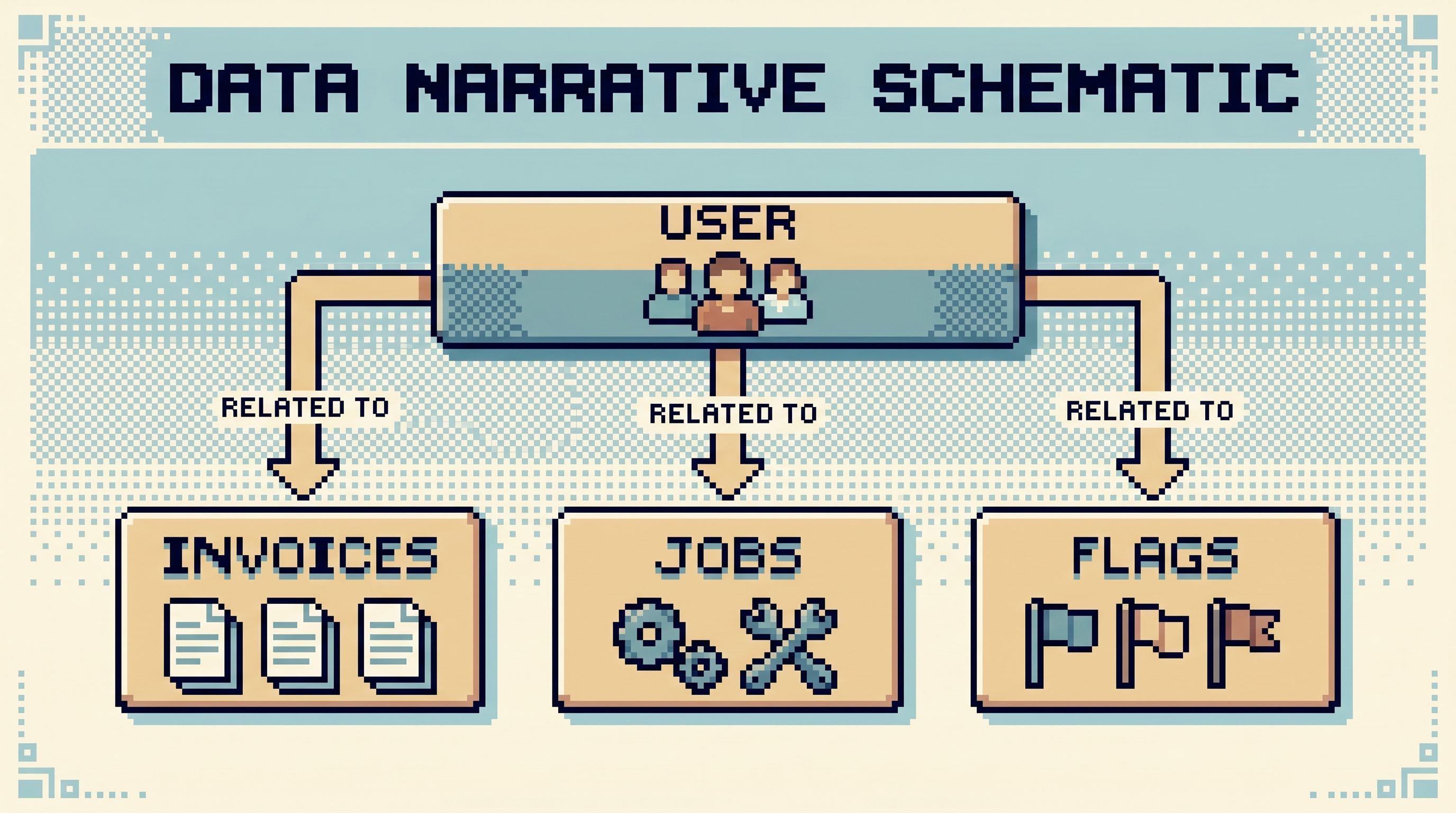
Every debug narrative has a cast:
- Primary actors – users, accounts, jobs, invoices
- Supporting actors – feature flags, experiments, background workers
- Setting – environment, region, shard, or tenant
Before you run queries, write down the IDs you care about:
user_id = U123invoice_id = INV456job_id = JOB789env = production-eu
Then, commit to a constraint:
Every query in this walkthrough is anchored to at least one of these IDs.
This does three things:
- Prevents accidental wide scans – you stay close to the real case instead of scanning whole tables
- Keeps the story grounded – every result ties back to your main character
- Makes repetition safer – re-running queries is less likely to hit unrelated data
Tools like Simpl can help here with opinionated filters instead of blank WHERE clauses, echoing the ideas in Opinionated Filters, Not Free‑Form Search.
Step 4: Walk the Timeline, Not the Schema Tree
Wandering follows tables. Walkthroughs follow time.
Instead of:
- “Let me click through
users→invoices→payments→jobs→events.”
Try:
-
Anchor on the moment the bug showed up.
- The time of the wrong invoice
- The timestamp of the alert
- The support ticket creation time
-
Read around that moment linearly.
- Rows just before
- The problematic row
- Rows just after
-
Extend forward and backward only as needed.
- “What changed just before this?”
- “What did the system do right after?”
Pagination and ordering matter more than people think. Cursor‑based, time‑ordered views turn debugging into reading a story instead of flipping channels. That’s the idea behind patterns like those in The Calm Cursor post.
Concrete moves:
- Always sort by a relevant time column (
created_at,updated_at,processed_at) - Use narrow time windows: minutes, not days
- Prefer cursor pagination over arbitrary offsets
You’re not building a dashboard. You’re reading a logbook.
Step 5: Capture Each Step as a Sentence
A walkthrough is only as good as what you can remember and share.
After each meaningful query or view, force yourself to write one simple sentence:
- “At 10:02, invoice
INV456was generated for $99 with planbasic.” - “At 10:05, a background job
JOB789updated the invoice to $0 after a failed payment.” - “At 10:06, the user retried checkout and a second invoice
INV457was created.”
This does a few things:
- Locks in intent – why you ran that query
- Prevents loops – you’re less likely to re-run the same query hoping for new insight
- Builds the narrative – by the end, you have a readable story
A calm browser can help here:
- Inline notes attached to queries
- A visible trail of “panes” or “cards” representing each step
- A way to collapse the session into a shareable link or log
If you’re stuck in a generic SQL editor, fake it with comments:
-- Step 3: Confirm what the invoice looked like before the update
SELECT ...
The goal is not documentation perfection. It’s a thin, linear trail.
Step 6: Stop When the Story Is Explainable
Wandering sessions don’t end. They just time out.
Walkthroughs end when you can say:
“Here is what happened, in three or four sentences, grounded in rows.”
For example:
- User
U123created invoiceINV456for $99 at 10:02. - A retry job mis‑classified a payment error as a cancellation and zeroed out the invoice at 10:05.
- The user retried checkout at 10:06, creating
INV457with the correct amount. - Our UI showed the wrong invoice because it always picks the oldest open invoice.
That’s a data walkthrough:
- It names the actors
- It follows time
- It points at specific rows
- It ends with an explanation you can share with support, product, or finance
When you reach this point:
- Stop querying
- Capture the story in your incident ticket, doc, or PR
- Save or bookmark the session if your tool allows it
Then, and only then, decide whether you need a deeper analysis in a more powerful tool.
Patterns That Keep Walkthroughs Calm
A few small constraints go a long way.
1. Read‑only as the default
Most debug work does not need writes. A post‑admin posture – like the one described in The Post‑Admin Session – keeps your walkthroughs safe by making “look” the default and “change” the exception.
2. One question per session
If you catch yourself adding a second, unrelated question, start a new session. Different story, different trail.
3. Narrow filters over free‑form search
Prefer:
user_id = U123over “search for email contains@example.com”- “Last 15 minutes” over “Last 30 days”
This keeps you out of doomscroll loops, echoing the habits in Mindful Data Work.
4. One primary surface, supporting tools on the side
Logs, traces, dashboards, and error trackers are supporting actors. Your primary narrative lives where the rows live. Tools like Simpl are designed to be that center of gravity.
A Concrete Example: Walking a Billing Bug
Imagine a support ticket:
“Customer says they were charged twice for the same month.”
A wandering session might:
- Open the billing dashboard
- Skim charts
- Jump into a SQL IDE
- Run a few
SELECT *queries - Get lost in unrelated invoices
A walkthrough might look like:
-
Question
“For userU123, why do they see two charges for April 2026?” -
Cast
user_id = U123subscription_id = S456- Time window: March 25 – April 5, 2026
-
Primary surface
Open Simpl, pin the user, and anchor on April 1 invoices. -
Timeline
- Read invoices for that user around April 1
- Read payment attempts for those invoices
- Read subscription state changes over the same window
-
Sentences
After each view, write one sentence:- “Two invoices created:
INV001at 09:01,INV002at 09:03.” - “First payment failed due to timeout; retry job created a second invoice instead of reusing the first.”
- “Two invoices created:
-
Ending
“The user was charged once, but the UI shows two invoices because we don’t hide failed ones. The fix is to adjust how we surface failed invoices, and to change the retry job to reuse existing open invoices.”
Notice what didn’t happen:
- No schema spelunking
- No wide scans
- No half‑finished queries
Just a story, told in rows.
Bringing This Into Your Team’s Practice
You don’t need a full process overhaul to move from wandering to walkthroughs. Start with small rituals:
- Name the question at the top of every debug ticket or incident channel.
- Pick a primary surface and say it out loud: “We’re running this from Simpl. Dashboards are reference only.”
- Anchor every query to at least one concrete ID.
- Write one sentence after each meaningful step.
- Stop when the story is explainable, not when you run out of curiosity.
Over time, these rituals become muscle memory. Your team spends less time wandering and more time telling clear, calm stories about what actually happened.
Summary
Data wandering is what happens when you debug without a narrative: many tools, many queries, little coherence. Data walkthroughs are the opposite: one question, one surface, one linear story grounded in rows.
The key moves are:
- Start with a question you can say out loud
- Choose a primary, read‑first surface
- Declare the cast of IDs you care about
- Walk the timeline instead of the schema tree
- Capture each step as a sentence
- Stop when the story is explainable
Opinionated browsers like Simpl make this easier by giving you a calm, structured place to read production data without drifting into admin or BI noise.
Take the First Step
You don’t have to redesign your entire debug process to benefit from this.
Next time you’re pulled into a bug or an odd support ticket:
- Write down a single, concrete question.
- Pick one calm surface for the session.
- Commit to telling a story in rows, not just running queries.
Try it once. Notice how it feels. If the session is quieter, shorter, and easier to explain afterwards, you’ve just taken your first step from data wandering to data walkthroughs.
Then, look at your tools. If they fight this way of working, it might be time to try a browser that doesn’t — something opinionated and calm, like Simpl, built for structured debug narratives instead of open‑ended exploration.