The Anti-Dashboard Onboarding: Teaching New Hires Production Data Through Rows, Not Reports


Onboarding someone into production data usually starts the same way:
- Add them to the warehouse.
- Share the dashboard folder.
- Point at a schema diagram.
They nod. They click. A week later, they still can’t answer a simple question without help:
“Which table is the real source of truth for subscriptions?”
The problem isn’t that they’re new. The problem is what you’re teaching them to look at.
This post is an argument for a different pattern: onboard new hires through rows, not reports. Less dashboard tourism, more time reading real user records in a calm, opinionated browser like Simpl.
Why Rows First Beats Dashboards First
Dashboards are tuned for aggregate sensemaking:
- Are signups trending up or down?
- Did latency spike around the deploy?
- What’s the error rate right now?
Useful questions. But they’re not the questions new hires struggle with.
New people struggle with concrete, narrative questions:
- “What does a ‘healthy’ customer look like in the database?”
- “Where do we store the real billing state, not just the denormalized copy?”
- “When this alert fires, which rows should I go look at first?”
You don’t answer those with a time series chart. You answer them by walking through actual records.
A rows‑first onboarding has a few quiet advantages:
-
Schema becomes a story, not a map. New hires see how tables relate in the context of a single user, invoice, or job — not as an abstract ERD.
-
On-call and support get easier. When incidents or tickets show up, they already know how to trace a concrete case through the database.
-
Risk goes down. You can pair a rows‑first approach with read‑only, opinionated tools like Simpl so people learn on safe surfaces instead of full‑power editors.
-
You avoid the “dashboard mirage.” New hires don’t confuse a pretty chart with the source of truth. They know that every number is backed by specific rows.
If you’ve already started moving away from dashboards as the primary surface for debugging, this will feel familiar. Posts like Database Work Without Dashboards: A Minimalist Stack for Everyday Debugging and Database Work Without Dashboards 2.0 cover that shift for incidents and day‑to‑day work. This post applies the same posture to onboarding.
The Anti-Dashboard Onboarding Shape
Instead of “here’s every tool and chart,” think:
“Here’s one real user. Let’s follow their story through the database.”
At a high level, the pattern looks like this:
- Pick one or two canonical flows (e.g., signup → subscription → invoice; job queued → processed → failed/retried).
- For each flow, pick one real example: a concrete user, job, or invoice.
- Walk through the exact rows that represent that example.
- Capture that walkthrough as a reusable path new hires can repeat.
Dashboards can show up later, as supporting context. But the first week is grounded in:
- IDs
- Timestamps
- Status fields
- Foreign keys
- Actual record lifecycles
This is where a calm database browser like Simpl fits: read‑only by default, linear navigation, opinionated filters, and just enough query power to follow a story without turning onboarding into a SQL workshop.

Step 1: Choose the Right First Questions
The worst way to start is, “Explore the schema and see what you find.”
The best way is, “Let’s answer one concrete question together.”
Borrow from the pattern in The Single-Question Onboarding:
- One user. “What happened to this user from signup to first payment?”
- One incident. “Why did this job fail last Tuesday for this tenant?”
- One invoice. “How did this invoice move from pending to paid?”
Good first questions share a few traits:
- They touch 3–6 tables, not 30.
- They represent a common, high‑signal flow (billing, auth, jobs, notifications).
- They have a clear beginning and end in the data.
Write these questions down. They’re not just for day one; they become the backbone of your onboarding track.
Step 2: Build a Calm Data Walkthrough, Not a Tour
Once you have your first question, resist the urge to give a grand tour.
Instead, design a linear walkthrough:
-
Start with the primary entity.
usersrow for a givenuser_id.jobsrow for a givenjob_id.invoicesrow for a giveninvoice_id.
-
Follow the foreign keys and timestamps.
- Which table records the next step in the lifecycle?
- How does that row reference the first one?
-
Keep a narrative log as you go.
- “User created at 2026‑06‑10 14:32 UTC.”
- “Subscription started 2 minutes later with plan
pro_monthly.” - “First invoice generated 1 hour later, status
pending.”
This is the same posture we use for debugging in From Noise to Narrative: Turning Raw Production Reads into Lightweight Debug Stories. For onboarding, you’re just making that narrative slower, explicit, and repeatable.
A few constraints keep this calm:
- No branching. If you jump to a table, explain why. Don’t open three new paths at once.
- No schema trees. Keep the focus on the rows you’re actually reading, not every possible relationship.
- No “while we’re here” detours. If something is interesting but not essential to the question, park it for later.
If your team uses Simpl, this walkthrough can live as a saved path of focused reads instead of a static doc: a sequence of queries, filters, and tables that new hires can literally replay.
Step 3: Standardize the “Row Reading” Ritual
New hires don’t just need to know where to look. They need to know how to look.
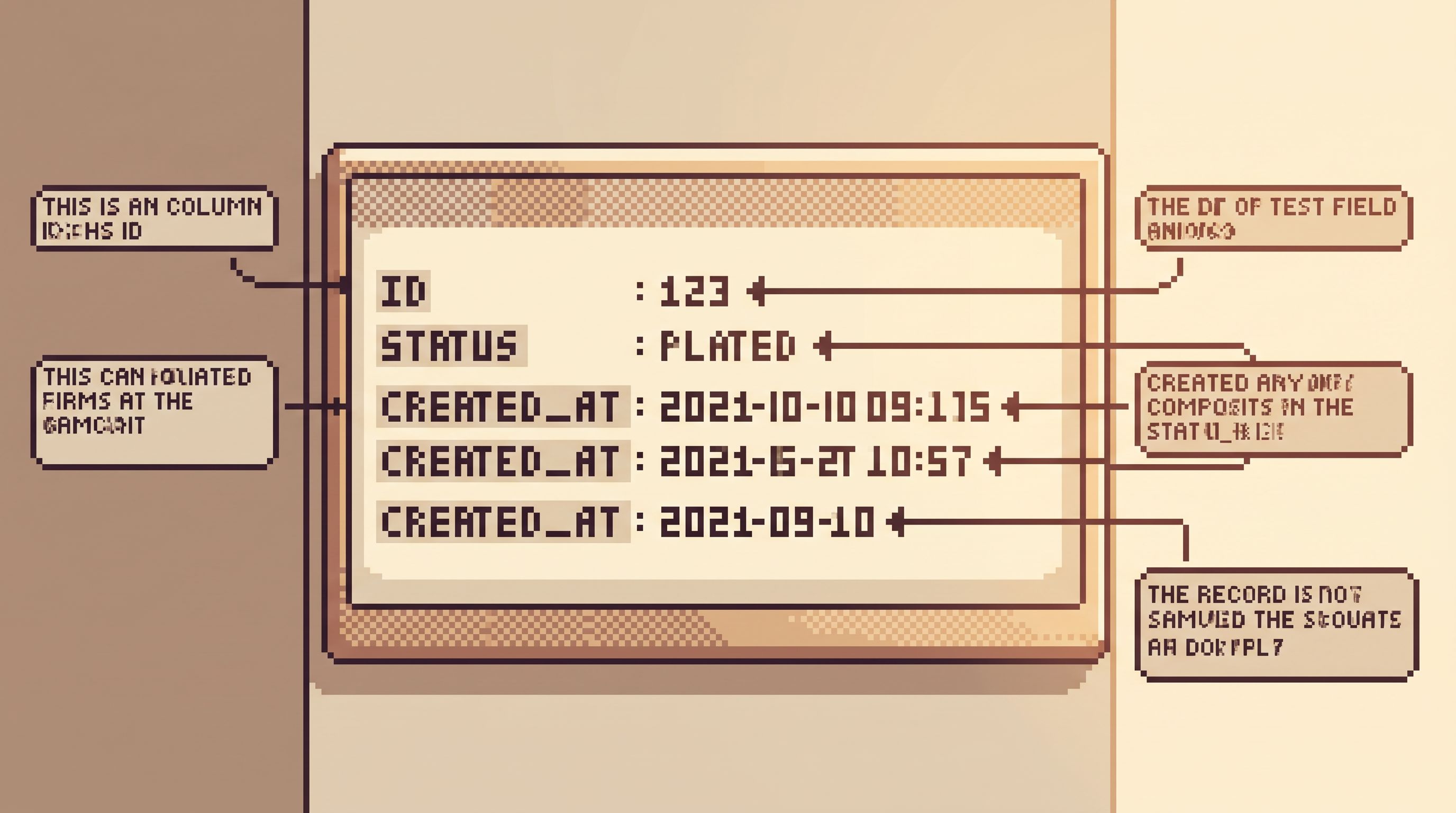
Give them a simple ritual for reading any row:
-
Identify the primary key.
- What uniquely identifies this record?
- How will you refer back to it later?
-
Scan the lifecycle fields.
created_at,updated_at,deleted_at- status columns (
state,status,stage)
-
Note the ownership fields.
user_id,account_id,tenant_id- Anything that ties this row to a real customer or domain concept.
-
Check derived vs. source fields.
- Which columns are inputs (user or system actions)?
- Which are derived (aggregates, caches, denormalized copies)?
-
Write a one-sentence story.
- “This row says user 123 signed up via Google on the
proplan on June 10 and is currently active.”
- “This row says user 123 signed up via Google on the
Repeat this until it’s boring. The goal is to make reading rows feel as natural as reading log lines or traces.
This is where opinionated tools help. A browser like Simpl can:
- Highlight key columns.
- De‑emphasize noisy or deprecated ones.
- Keep pagination linear so you don’t get lost jumping around. (For more on why that matters, see The Calm Cursor: Pagination Patterns That Keep Production Debugging Linear.)
Step 4: Use a Safe Surface, Not a Full SQL IDE
Onboarding is not the time to hand someone a full‑power editor pointing at production.
You want constraints that:
- Make it hard to run risky queries.
- Encourage focused reads over wide scans.
- Keep the mental model simple: “I’m here to understand, not to experiment.”
That’s the philosophy behind tools like Simpl:
- Read‑only by default.
- Opinionated filters instead of arbitrary
SELECT *everywhere. - Saved, named queries that encode your best practices.
Pair this with a few lightweight rules:
- No
SELECT *over hot tables during onboarding. - No ad‑hoc joins in production until they’ve practiced in a sandbox.
- No writes from the onboarding surface, ever.
If you do want to teach SQL early, do it in a sandbox that mirrors production schema but not data. The pattern in The Calm Query Sandbox: Practicing Production Reads Without Touching Live Data is a good starting point.
Step 5: Encode Onboarding as Reusable Paths
The first time you walk a new hire through a flow, it’s a conversation.
The second time, it should start looking like a path:
- A list of tables to open.
- Filters to apply.
- IDs to plug in.
- Questions to answer at each step.
Over time, you can turn these into reusable artifacts:
- Saved queries in Simpl named after flows:
user_signup_story,invoice_lifecycle,job_retry_story. - Lightweight checklists in your onboarding doc: “To understand a failed job, follow these 5 reads.”
- Short screen recordings of someone narrating a single walkthrough.
The key is to keep each path single‑intent. One question per path. One story per walkthrough. If you feel it branching, split it into two.
This mirrors the habit from The Single-Intent SQL Session: limit each session — and each onboarding exercise — to one real question.
Step 6: Delay Dashboards Until There’s a Story to Anchor Them
Dashboards aren’t banned. They’re just not the first step.
Once a new hire can:
- Trace a user through signup and billing.
- Explain how a job moves from queued to processed.
- Read a row and tell its story.
…then dashboards become useful context:
- “This chart shows how often that job fails across all tenants.”
- “This panel shows how many users are in each subscription state you just learned.”
- “This graph spikes when a lot of those invoices get stuck in
pending.”
Because they already understand the underlying rows, dashboards stop being mysterious and start being summaries.
You can even tie them directly to your row‑based paths:
- From a dashboard panel, link to a saved query in Simpl that shows the exact rows behind a spike.
- From an incident runbook, link to both the high‑level alert chart and the canonical row walkthrough.
This keeps dashboards in their proper place: signal, not source of truth.
Step 7: Make Onboarding Look Like Real Work
The final step is to connect onboarding exercises to the work new hires will actually do:
-
On-call rotations.
- Before they carry the pager, they should have walked the rows behind at least one real past incident.
- Pair them with someone running an incident from rows, as described in Post-Dashboard On‑Call: Running Incidents From Rows, Not Charts.
-
Support tickets.
- Give them a closed ticket and ask them to reconstruct the story from the database.
- Measure success by how well they can narrate the rows, not just find them.
-
Product questions.
- When PMs ask “how many users hit this edge case?”, have new hires help answer by starting from one concrete example and then generalizing.
If onboarding feels like a separate, artificial track, people will revert to old habits under pressure. If it feels like a quieter version of real production work, the habits stick.
Summary
An anti-dashboard onboarding doesn’t hate dashboards. It just refuses to let them be the first thing new hires see.
Instead, it:
- Starts from one concrete question about a real user, job, or invoice.
- Walks through actual rows, following foreign keys and timestamps.
- Teaches a simple row reading ritual: keys, lifecycle, ownership, derived vs. source.
- Uses a calm, constrained surface like Simpl instead of a full SQL IDE.
- Encodes the best walkthroughs as reusable paths and saved queries.
- Introduces dashboards later, as summaries of stories they already understand.
The result is a quieter kind of onboarding:
- New hires learn where truth actually lives.
- On-call and support become less intimidating.
- Your team builds a shared habit of thinking in terms of rows, not just charts.
Take the First Step
You don’t need to redesign your entire onboarding program to start.
Pick one:
- Choose one real user and walk a new hire through their lifecycle in the database.
- Write down a five-step path for understanding a failed job from rows alone.
- Save a single, named query in Simpl that tells a complete story about one invoice.
Run it once. Then run it again with the next hire. Refine as you go.
Onboarding through rows instead of reports is not a big‑bang change. It’s a series of small, opinionated choices that move your team toward calmer, clearer production work.
Start with one story. Then make it the way you teach everyone to see the database.