From Tickets to Trails: Designing Opinionated Paths from Jira Issues into Live Data

Software teams already know how to open a Jira ticket.
What most teams don’t have is a calm, reliable way to walk from that ticket into the exact rows that explain what happened—and then back again.
So incidents stretch. Tickets bounce. People paste screenshots into Slack. Context lives in heads and DMs instead of in the tools that are supposed to hold it.
This post is about taking a stance: if your team runs on Jira, then Jira issues should be first-class entry points into live data trails—not dead-end descriptions that send people hunting through consoles and dashboards.
Opinionated paths from ticket → data (and back) are how you:
- Shorten incident timelines without adding noise
- Turn one-off investigations into reusable trails
- Make production reads feel safe, focused, and repeatable
Along the way, we’ll use Simpl as the mental model: a calm, opinionated database browser that’s built for reading and understanding production data, not for becoming another BI tool or admin console.
Why tickets should lead, not just describe
A Jira issue is usually the first structured artifact created when something is wrong:
- A customer reports a billing bug.
- An alert fires and someone opens an incident ticket.
- A product manager notices a suspicious metric and files a task.
What happens next is often a tangle:
- Someone asks for “more context” in comments.
- Another person opens a SQL client and starts guessing at tables.
- Screenshots of dashboards get pasted into Slack.
- The original ticket becomes a summary of what people did elsewhere, not the place where the real trail lives.
This has three quiet costs:
- Every ticket is a fresh maze. Even if you’ve seen this class of issue before, you start from scratch: new queries, new dashboards, new ad-hoc joins.
- Knowledge doesn’t accumulate. The SQL that actually answered the question lives in a local history, not in the ticket. The next engineer re-learns it.
- On-call gets louder. At 2 a.m., the path from “this Jira ticket” to “these rows are wrong” is long and brittle.
A calmer alternative: treat each Jira issue as a handle onto a small number of opinionated trails into your data.
Instead of:
"See Slack thread for investigation details."
You want:
"Click this link to follow the same trail I used: from this order ID, through payments, to refunds."
That’s the shift—from tickets as narratives about data to tickets as entry points into data trails.

What an opinionated trail from Jira actually looks like
An opinionated trail is not a pile of saved queries.
It’s a narrow, structured path that encodes:
- Where you start (ticket fields, IDs, timestamps)
- Which tables and filters you touch (and in what order)
- What you’re trying to learn (state, scope, impact)
A simple example: a “Failed Checkout” incident.
You might define a canonical trail:
-
Start from the ticket.
- Jira fields:
user_id,order_id,checkout_at,region. - The ticket template encourages including these.
- Jira fields:
-
Trail step 1: orders table.
- Query:
SELECT state, created_at, total_cents FROM orders WHERE id = :order_id. - Goal: confirm order existence and state.
- Query:
-
Trail step 2: payments table.
- Query:
SELECT state, gateway, failure_code FROM payments WHERE order_id = :order_id ORDER BY created_at DESC LIMIT 5. - Goal: see payment attempts and failure modes.
- Query:
-
Trail step 3: refunds table.
- Query:
SELECT * FROM refunds WHERE order_id = :order_id. - Goal: check for partial or duplicate refunds.
- Query:
-
Trail step 4: related jobs.
- Query:
SELECT state, run_at, error FROM jobs WHERE payload->>'order_id' = :order_id ORDER BY run_at DESC LIMIT 10. - Goal: see async fallout.
- Query:
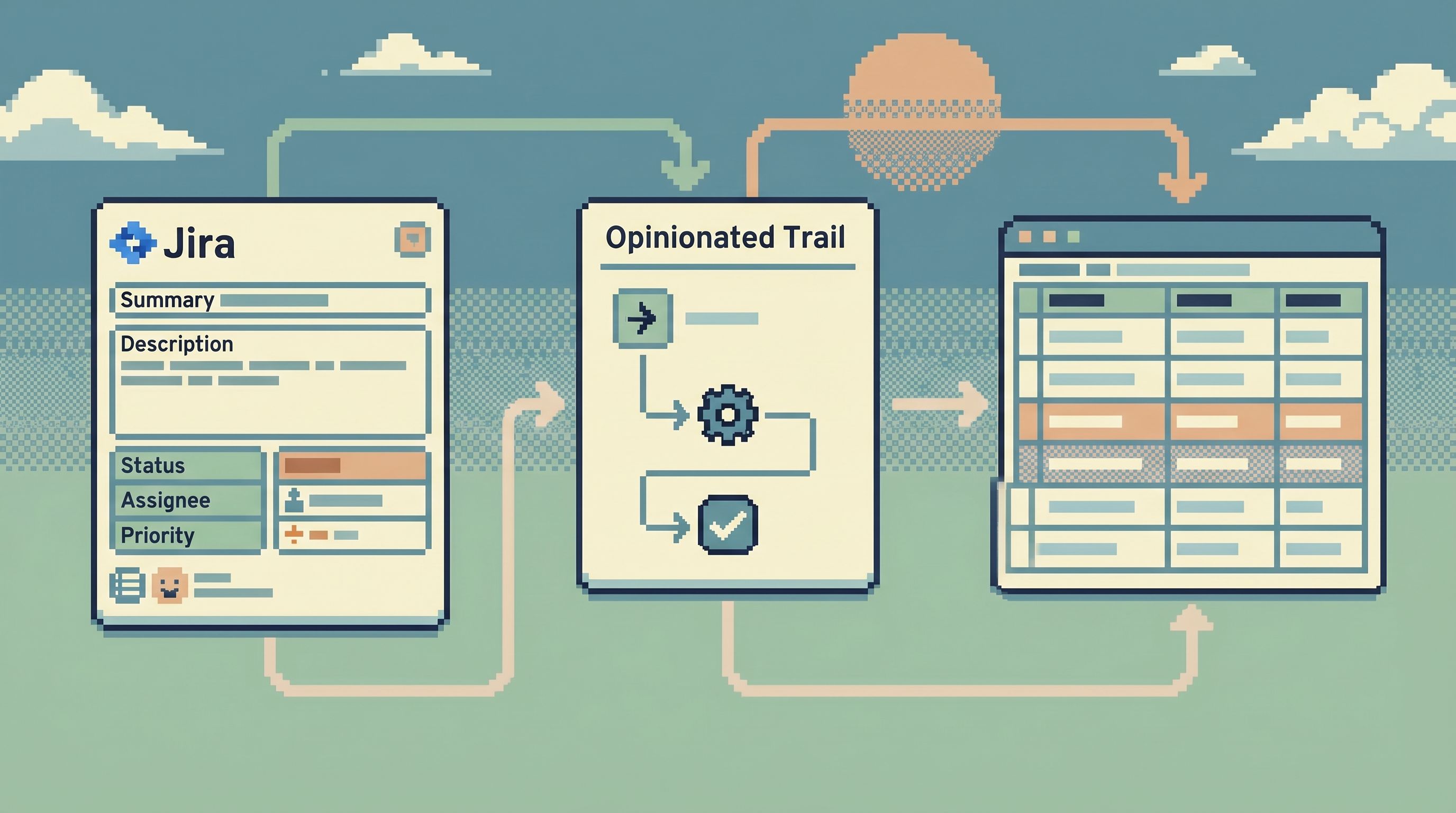
Wrapped in a calm browser like Simpl, that trail becomes a guided experience instead of four unrelated queries:
- The ticket passes
order_idanduser_iddirectly into the trail. - Each step is a tab or breadcrumb, not a blank editor.
- You can share a link to “step 3 of this trail for this ticket” as a quiet handoff.
This is the same stance we explored for incidents in From Dashboards to Data Trails: A Minimal Workflow for Following an Incident Across Services. The difference here is that Jira becomes the front door.
Designing the path: start from real tickets, not schemas
Most teams design integrations from the database outward:
"We have these tables; what should we expose to Jira?"
Flip it.
Start from the last 20 tickets that required database work and ask three questions for each:
-
What was the real question?
- "Did we double-charge this customer?"
- "Did this migration touch accounts outside region X?"
- "Which jobs silently failed for this tenant last week?"
-
Which IDs and fields were actually used?
- User IDs, order IDs, tenant IDs, job IDs.
- Time windows: “between deploy X and deploy Y,” “last 24 hours,” etc.
-
Which tables and joins did people end up using?
- Not what they thought they’d need, but what they actually queried in the end.
From there, you can define a small set of canonical trails:
- Customer billing trail
- Order lifecycle trail
- Background job failure trail
- Migration verification trail
Each trail becomes a named, opinionated path that:
- Accepts a narrow set of inputs (IDs, timestamps, maybe region)
- Walks a fixed sequence of tables/views
- Answers a specific class of question
This is the same move we made away from “saved queries” toward opinionated trails in Database Work Without Bookmarks: Using Opinionated Trails Instead of Saved Queries. Jira is just another consumer of those trails.
Wiring Jira into live data trails
Once you’ve named a few trails, the next step is to connect Jira issues to them in a way that feels natural and low-friction.
1. Tighten your Jira templates
Opinionated trails need opinionated inputs.
Update your Jira issue types (especially incident and customer-issue types) to include fields that map cleanly into your trails:
- Structured IDs
user_id(string)order_id(string)tenant_id(string)
- Time bounds
started_at(datetime)ended_at(datetime)
- Environment
env(enum:prod,staging,sandbox)
Make these fields:
- Required for incident tickets
- Clearly labeled in templates (“Needed to follow the data trail for this issue”)
The goal is not bureaucracy. It’s to guarantee that, when someone opens a ticket, they’re also creating the inputs your trails need.
2. Embed trail links directly in Jira
You don’t need a huge integration to get value.
Start with something simple:
- A custom field called “Data trail” that holds a URL.
- That URL points to a pre-configured trail in a browser like Simpl, with query parameters for
user_id,order_id, etc.
For example:
https://your-simpl-instance/trails/order-lifecycle?order_id=1234&env=prod
Engineers can:
- Paste this link manually at first
- Later, use a Jira automation or small internal tool to generate it from fields
Over time, you can make this smarter:
- A Jira workflow post-function that auto-populates the data trail link when required fields are set
- A small “Open data trail” button in Jira that launches the right trail based on issue type
3. Keep the trail narrow and read-focused
The path from Jira into data is not the place for:
- Schema changes
- Ad-hoc experimental SQL
- Bulk edits
Keep this layer read-only and intentionally narrow. The goal is:
- Clarity over power: answer the ticket’s question, don’t expose the whole database.
- Safety by design: make dangerous queries hard to even express.
If you want more detail on shaping this layer safely, see:
- Opinionated Read-Only Roles: How Access Design Shapes Everyday Database Work
- Beyond ‘SELECT *’: Small Query Habits That Make Production Databases Feel Safer
Guardrails that keep trails calm under pressure
Opinionated trails really earn their keep during incidents, when attention is scarce.
A few design choices make the difference between “calm path” and “another noisy tool.”
1. One question per trail
Each trail should answer a single class of question:
- "What happened to this order?"
- "Which jobs failed for this tenant during this window?"
- "Which accounts were touched by this migration?"
If you find yourself adding optional branches (“sometimes we also look at X, Y, Z”), split it into two trails.
2. Fixed sequence of steps
Avoid branching UI.
A good trail feels like:
- Start with the core entity (order, user, job)
- Follow the most important relationships
- End with a clear sense of state and impact
Breadcrumbs or numbered steps help:
1. Order → 2. Payments → 3. Refunds → 4. Jobs
3. Opinionated defaults, not blank filters
When someone lands on a trail from Jira, they should see:
- The right environment (prod vs staging) pre-selected
- A sensible time window (e.g., ±2 hours around the incident time)
- Safe limits (e.g., 100 rows, not unbounded scans)
Avoid:
- Empty date pickers
- Unscoped queries
- Free-text search boxes as the first move
This is the same “anti-search bar” stance we wrote about in The Anti-Search Bar: Why Blind Querying Hurts Focus (and How Opinionated Paths Help). Trails should feel like doors, not like blank search engines.
4. Links back into Jira
The trail shouldn’t be a one-way exit from Jira.
Make it easy to:
- Jump back to the originating ticket from the trail UI
- Attach notes or findings that reference specific trail steps
- Copy a stable link to “this exact view” for handoffs
This turns trails into part of your team’s knowledge, not just a personal debugging tool.
Quietly evolving your trails over time
You don’t have to design perfect trails on day one. In fact, you shouldn’t.
Instead, treat them as living, opinionated artifacts that evolve as you learn.
Start small
Pick one or two high-frequency issue types:
- Failed checkouts
- Stuck background jobs
- Billing discrepancies
For each, define:
- The minimal set of Jira fields you need
- A single canonical trail
- A convention for naming the trail links in Jira
Watch how people actually use them
Over a few weeks:
- Notice where people still drop to ad-hoc SQL
- Capture the extra steps they take
- Ask: is this a new trail, or a missing step in an existing one?
Fold the learnings back into the trail
When you find a pattern:
- Add a new step to the trail, or
- Split the trail into two narrower ones, or
- Tighten the Jira template so the right inputs are always present
The key is to keep the number of trails small and their intent sharp. A graveyard of half-used trails is no better than a graveyard of saved queries.
Where a focused browser like Simpl fits
You can build opinionated paths from Jira into live data with almost any stack.
But some tools make it easier than others.
A focused database browser like Simpl is well-suited to this job because it:
- Optimizes for reads, not schema surgery
- Encourages narrow, opinionated trails instead of blank editors
- Plays nicely with read-only roles and safety guardrails
You can:
- Define named trails that mirror your common Jira issue types
- Accept query parameters (IDs, timestamps, environments) from Jira links
- Share stable URLs to specific trail steps for quiet handoffs between engineers
This sits in the same middle layer we’ve written about in Post-Admin, Pre-CLI: Where a Focused Database Browser Actually Fits in Your Stack: between dashboards and admin tools, between BI and raw SQL.
The combination of Jira + opinionated trails + a calm browser like Simpl gives your team a straight line:
Alert → Jira ticket → Data trail → Rows → Updated ticket
No wandering. No guessing. No hunting for “that query I ran last time.”
Summary
Designing opinionated paths from Jira issues into live data is less about integration and more about intent.
You:
- Start from real tickets and the questions they represent.
- Define a small set of canonical trails that answer those questions.
- Tighten Jira templates so each ticket carries the inputs those trails need.
- Embed links from Jira into a focused, read-only browser that walks those trails.
- Evolve the trails based on how incidents and investigations actually play out.
The payoff is quiet but substantial:
- Shorter incidents
- Safer production reads
- Less duplicated work
- Tickets that are real entry points into your data, not just summaries of what happened elsewhere
Take the first step
You don’t need a full integration project to get started.
This week, you can:
- Pick one high-frequency issue type in Jira. Failed checkouts, stuck jobs, billing questions.
- Write down the exact steps you took last time to debug it in the database. Tables, filters, joins, in order.
- Turn that into a single, named trail. Even if it’s just a short internal doc or a URL template into your existing tools.
- Add one field to your Jira template to capture the ID that trail needs.
- Paste a trail link into the next ticket of that type and see how it feels.
If you want a tool that’s built around this style of work—a calm, opinionated database browser that makes trails a first-class concept—take a look at Simpl. It’s designed for exactly this middle layer: from tickets to trails, from incidents to rows, without the noise.