Read Trails, Not Logs: Turning Database Sessions into Shareable Narratives

Most teams still treat database work like log scrolling.
You open a client. You connect to production. You run a few queries. Maybe you copy a snippet into Slack or paste a screenshot into a ticket. Then you close the tab.
The story disappears.
You got an answer, but you didn’t create anything reusable. The next person starts from zero, runs a slightly different set of queries, and re‑discovers the same facts in a slightly different way.
There’s a calmer alternative: treat each database session as a trail—a readable narrative that someone else can follow, replay, and extend.
Tools like Simpl are built around this idea. Instead of a blur of ad‑hoc queries, you get opinionated paths through your data that feel more like reading a story than staring at logs.
This post is about what that shift looks like in practice, why it matters, and how to start building trails in the tools you already use.
Why logs aren’t enough
Logs are great for machines and terrible for humans.
They’re:
- Fragmented – each line is a moment in time, stripped of context.
- Redundant – the same fact appears in slightly different forms across services.
- Ephemeral – retention windows, sampling, and indexing quirks mean key pieces disappear.
When you debug only from logs, you end up:
- Reconstructing mental models from scattered clues.
- Re‑running the same searches across incidents.
- Sharing screenshots instead of structured reasoning.
Meanwhile, your database already holds a coherent story:
- What happened to this user over the last 90 days.
- How this job moved through states.
- When a migration quietly changed the meaning of a column.
The problem isn’t access to data. It’s how that access is shaped.
A log mindset encourages scrolling and reacting.
A trail mindset encourages reading and narrating.

What a “trail” actually is
A trail is not just query history.
Most tools already keep a list of past queries. It’s usually:
- Unstructured
- Duplicated
- Hard to search
- Impossible to share cleanly
A trail is different:
A deliberate sequence of steps through your data, tied to a question, annotated with context, and safe to replay.
Concretely, a good trail has:
-
A clear starting question
Examples:- “Why did user 123 cancel yesterday?”
- “Did the migration on
2026-02-10change invoice behavior?”
-
A small number of ordered steps
Each step is a query or view with a reason to exist:- Step 1: Fetch core user record.
- Step 2: List subscription events.
- Step 3: Check payments around cancellation.
-
Inline notes
Short, opinionated annotations:- “We expect one active subscription here.”
- “This flag flipped during the migration window.”
-
Safe defaults
Trails should be read‑first. Write queries, if any, are:- Explicitly marked.
- Rare.
- Reviewed.
-
A stable link
Something you can drop into Slack, an incident doc, or onboarding materials so someone else can:- Reopen the same steps.
- See the same structure.
- Extend the trail instead of starting over.
If you’ve read our earlier post on turning ad‑hoc exploration into storylines, this should feel familiar. Trails are the concrete version of that idea: From Tabs to Trails: Turning Ad-Hoc Database Exploration into Reproducible Storylines.
Why this shift matters for teams
Moving from logs to trails changes how your team thinks about database work.
1. You get reusable investigations
Instead of:
- “Ask Alice, she debugged something like this last month.”
You get:
- “Here’s the trail Alice used—start there.”
Over time, you accumulate:
- Trails for common incident patterns.
- Trails for tricky edge cases.
- Trails for cross‑service flows (e.g. billing, auth, provisioning).
These become living runbooks—not static docs that drift, but real queries that still run.
This is the same stance we take in our piece on sharing context without meetings: Async Debugging: How to Share Database Context Without Spinning Up a Meeting.
2. You lower cognitive load
A good trail means:
- Fewer tools open.
- Fewer side quests.
- Less time reconstructing what you already figured out 20 minutes ago.
Instead of bouncing between logs, dashboards, and ad‑hoc SQL, you walk a single path through the data that actually matters.
If you’ve ever felt the fatigue described in Database Work Without the Side Quests: Reducing Context Switching in Day-to-Day Queries, trails are one of the cleanest antidotes.
3. You make production access safer by default
Trails encourage:
- Read‑only first: most steps are selects and views.
- Guardrails: any write is deliberate and well‑labeled.
- Reviewability: it’s obvious which steps are risky.
This lines up with the guardrail philosophy behind Simpl and posts like Read-Only by Default: Building Safer Production Database Workflows Without Slowing Engineers Down.
4. You onboard people with stories, not schemas
New engineers don’t need a full schema tour.
They need:
- “Here’s how a signup flows through the database.”
- “Here’s how a subscription renewal looks in data.”
- “Here’s a real incident trail and how we debugged it.”
Trails are concrete, narrative, and grounded in real questions. That’s far more learnable than a static ERD or an out‑of‑date dashboard.
How to design a trail‑first database session
You don’t need new infrastructure to start working this way. You need a few opinionated habits.
1. Start with a written question
Before you run the first query, write the question you’re answering.
Keep it:
- Specific – “Why did job 9876 retry 5 times between 14:00–14:10 UTC on 2026‑02‑11?”
- Scoped – one user, one job, one incident, one migration.
Put this at the top of your session:
- As a comment in your SQL file.
- As the title of a trail in Simpl.
- As the header of a shared link.
This anchors every subsequent step. If a query doesn’t serve the question, it doesn’t belong in the trail.
2. Limit yourself to a small number of steps
A trail is not a full transcript. It’s the edited version.
Aim for:
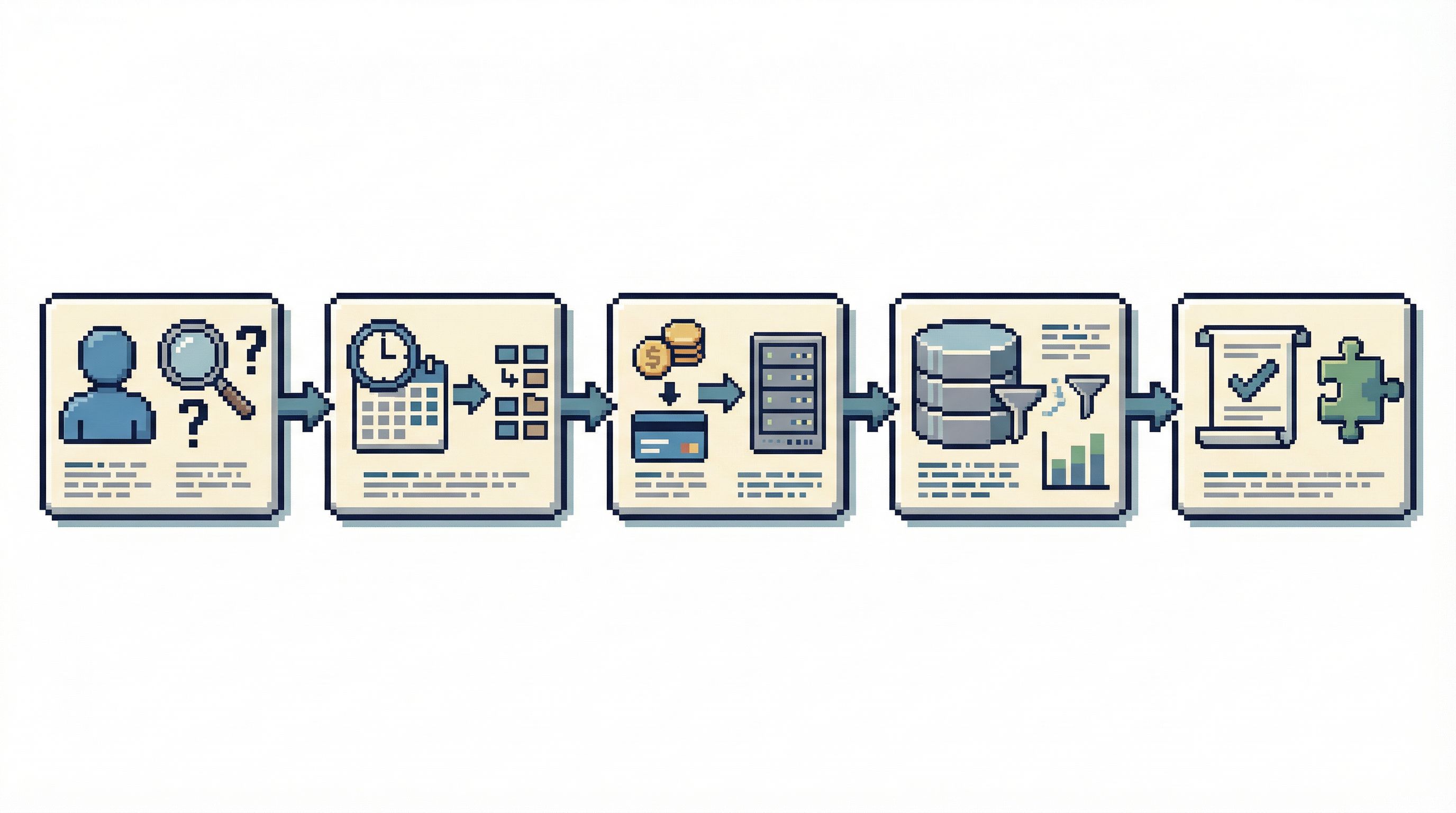
- 3–7 core steps for a typical investigation.
Examples for a “user cancelled unexpectedly” trail:
-
User snapshot
- Select from
usersbyuser_id. - Include key flags: plan, status, created_at, deleted_at.
- Select from
-
Subscription history
- Events from
subscriptionsorsubscription_eventsordered by time.
- Events from
-
Billing provider link
- Mapping from internal user/subscription to external provider IDs.
-
Payment attempts around cancellation
- Filtered view of payments in a small time window.
-
Recent experiments or feature flags
- Any toggles that could have changed behavior.
You might run more queries while exploring, but only the ones that moved the story forward become “official” steps.
3. Add short, opinionated notes
Each step should answer two questions:
- What are we looking at?
- What do we expect to see?
Examples:
- “We expect exactly one active subscription here. If there are more, something duplicated the record.”
- “Cancellation should come from
source = 'user'for self‑serve; anything else suggests an automated process.”
These notes turn raw queries into explainable reasoning. They also make trails much easier to reuse later.
4. Use narrow, readable queries
Trails are for humans. Optimize for clarity over cleverness.
Prefer:
- Explicit column lists over
SELECT *. - Clear predicates over dense, generic filters.
- Small, focused time windows.
Example:
-- Step 2: Subscription history for user 123 around cancellation
SELECT
  id,
  user_id,
  status,
  source,
  created_at
FROM subscription_events
WHERE user_id = 123
  AND created_at BETWEEN '2026-02-10' AND '2026-02-12'
ORDER BY created_at;
This is not the most generic query. That’s the point. It’s tuned to the story you’re telling.
5. Treat writes as exceptional
If your trail includes any write operations:
- Put them in a separate, clearly labeled section.
- Add bold warnings and preconditions.
- Prefer parameterization and guards.
In many cases, the trail should stop at the point where a write is required, and the actual change happens through a safer, separate process.
This is where opinionated tools like Simpl help: they make read‑only the default and push writes into deliberate workflows.
6. End with a short conclusion
At the bottom of the trail, write two or three sentences that answer:
- What did we learn?
- What changed in our understanding of the system?
- What, if anything, should we watch next time?
This doesn’t need to be formal. It just needs to be explicit.
Where tools can help (and where they get in the way)
You can build trails in a plain SQL file. But your tools can either:
- Make trails the natural way to work, or
- Fight you with tabs, noise, and opaque history.
A trail‑friendly database browser should:
-
Favor linear flows over tab explosions
One question, one path, one place to look. -
Keep query + result + note together
Not just a SQL snippet, but the context and output that mattered. -
Make sharing a first‑class action
A stable link that opens the same trail, not just a screenshot of a single step. -
Default to read‑only
So you can share trails widely without worrying that someone will copy‑paste a dangerous write.
What IDEs Got Wrong About Database UX (and How Tools Like Simpl Can Do Better) goes deeper on why “SQL editor with tabs” is a poor default for this kind of work.
Simpl leans into these patterns on purpose:
- Sessions are structured as calm, linear trails.
- Notes live next to queries, not in a separate doc.
- Sharing a trail is as intentional as running one.
You don’t need to switch tools to adopt the mindset, but a quieter browser makes it much easier for the pattern to stick.
Making trails a team habit
A single engineer can build trails. A team can live in them.
Here’s how to nudge your culture in that direction.
1. Ask for trails in incident reviews
Instead of:
- “Can you drop the queries you ran into the doc?”
Try:
- “Can you add a short trail for how you debugged this?”
Over time, your incident folder becomes a library of real, runnable narratives.
2. Use trails in onboarding
When someone joins the team, don’t just give them schema diagrams.
Give them:
- A “signup journey” trail.
- A “billing failure” trail.
- A “feature flag rollout” trail.
Ask them to walk the trails, tweak a step, and explain what they see. This builds shared mental models faster than any static doc.
3. Standardize a light template
You don’t need a heavy process. A simple convention is enough:
- Title: question being answered.
- Steps: 3–7, each with query + note.
- Conclusion: 2–3 sentences.
- Optional: tags (user‑level, billing, migration, etc.).
Make this the default way you share database discoveries.
4. Prune and evolve
Trails are living artifacts. Revisit them when:
- Schemas change.
- Services move.
- You learn a better path through the data.
Retire trails that no longer reflect reality. Update the ones that are still useful. Keep the library small, opinionated, and trusted.
This is the same spirit as running schema changes calmly instead of chaotically; see The Quiet Migration: Using Calm Database Tools During Schema and Service Changes for more on that pattern.
Summary
Most teams treat database sessions as disposable. You connect, you query, you close the tab. The context disappears.
A trail mindset flips that:
- Start with a clear question.
- Capture a small, linear set of steps.
- Annotate what you expect and what you found.
- Share the result as a reusable narrative, not a screenshot.
The benefits are compounding:
- Less repeated work.
- Clearer incident response.
- Safer production access.
- Faster onboarding.
Tools like Simpl make this easier by giving you a calm, opinionated interface that treats trails—not logs, not tabs—as the primary unit of work.
Take the first step
You don’t need to redesign your entire workflow to start working in trails.
Pick one real question you’re answering this week:
- A confusing user state.
- A noisy migration.
- A billing edge case.
Then:
- Write the question down before you query.
- Limit yourself to 3–7 meaningful steps.
- Add a one‑line note to each step.
- Share the result as a link or a small doc.
If you want a tool that’s built around this style of work, open your production database in Simpl and treat your next session as a trail, not a log scroll.
See how it feels to read your database, not just query it.